
About FAQs Features Pricing Log in

Every tool One workspace

Eleven things you currently keep in eleven tabs. Bring in the apps you already use, or use Kabiri's own and drop them - most people end up doing some of both.

Email

Every inbox in one place

Connect the accounts you already have and read them together, or as separate inboxes when you want to keep work and personal apart. Turn any message into a task, a note or a calendar event without leaving the thread.

  • Gmail, Outlook and Yahoo side by side
  • Split, list or conversation view
  • Save a message as a note or a to-do in one click
Brings in

Calendar

Your week, not your calendars

Bring every calendar you own into one place and see them layered together. Agenda, day, week, month and year views, with your to-dos on the same grid as your meetings.

  • Google and Outlook accounts side by side
  • Subscribe to anyone else's calendar by link
  • Tasks, events and bookings on one grid
  • A Plan view that replans: overdue work, meetings hiding in your email, a morning off
  • Drag to reschedule, anywhere in the app
Brings in

To-dos

A to-do list that stays where the work is

Tasks live in a panel you can open from anywhere, so adding one never costs you your place. Give them a date and they show up on the calendar; attach them to a project and they show up there too.

  • Open from any tab without losing your place
  • Due dates land on the calendar automatically
  • Made from an email, a note or a message in one step
Today
Send the type specimen
Export mono logo
Second colour pass
Write the brand summary
Tomorrow
Invoice Acme

Notes

Notes that behave like notes

Write and it saves - there is no Save button. Headings, checklists, quotes, images, reminders and tags, with links between notes when one thing leads to another. Keep a note as a template and start the next one from it.

  • Autosaves as you type, grouped by day
  • Checklists, reminders, tags and note-to-note links
  • Import what you already wrote in Notion
Brings in

Boards

Room to think before it is a plan

An infinite canvas for the part of the work that is not a list yet - sticky notes, images, shapes, arrows between things. Drop in a file or a note you already have and arrange until it makes sense.

  • Sticky notes, drawings, images and connectors
  • Pull in notes and files you already have
  • Pan and zoom as far as the idea goes
Hero: swap video for the board demo
Aqua on pricing cards?
Case study page
Ask Sam

Files

Every drive, one file browser

Google Drive, OneDrive and Dropbox in a single tree, next to whatever you store in Kabiri. Preview documents, images, PDFs and video inline instead of downloading to find out what something is.

  • Drive, OneDrive and Dropbox in one place
  • Inline preview for documents, PDFs, images and video
  • Attach anything to a note, task or message
Brings in

Contacts

The person, and everything attached to them

One record per person or company, with the mail, meetings, files, notes and projects that touch them gathered underneath. Useful the moment you need to remember what was agreed and when.

  • People and companies, linked to their work
  • Everything they appear in, in one view
  • Built from the accounts you already connected
PAPriya AnandMeridian - brand refresh
JCJacob CrossAutumn campaign
TBTom BeckerNorthlight - discovery
EFElena FiskCommission - three prints

Kabiri Assistant

The busywork, handled

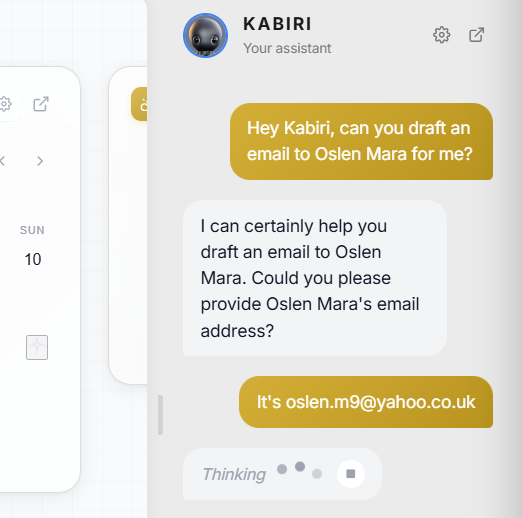
Ask for the thing rather than doing the steps: summarise a thread, draft the reply, pull this week into a list, write the note, find the file. It can see your workspace, so you do not have to explain it first.

  • Summarise, draft and tidy up across every tool
  • Creates notes, tasks and events for you
  • Works from your own data, not a blank page
The Kabiri Assistant at work

Chat

Messages without another tab

Talk to your team in Kabiri, and read the Slack channels you are already in from the same place. Turn a message into a task or a note the moment it turns into work.

  • Direct messages and channels for your team
  • Read your Slack workspace alongside them
  • Message to task or note in one step
Brings in
Did the specimen go over?
Sent this morning - Priya's happy with it
Nice. Colour pass still Friday?
Yep, it's on the board

Teams

Share the workspace, not your password

Invite the people you work with and decide what each of them can reach. Shared projects, shared files and shared boards, with the rest of your workspace still yours.

  • Per-person permissions on what is shared
  • Shared projects, files and boards
  • Guests you can scope to a single room
Studio - 4 people
KMYouOwner
SRSam ReidCan edit
ACAmelia CrossCan edit
RSRobin SatoCan view

Start with the free plan

Every built-in tool, no card, no trial clock. Upgrade when you outgrow it.

nothing - see the note on #integrations-section below. -->